

- To create a receipt template, build one layout with a receipt number, date, payer, itemized lines, a rounded total and a payment method, then save it as a reusable file.
- Excel and Google Sheets calculate totals with SUM and ROUND and number receipts with TEXT, while Word uses a SUM(ABOVE) field and a SEQ field that must be reset by hand in each copy.
- In the United States the IRS lists receipt books among the supporting documents to keep, generally until the period of limitations for the return runs out, which is 3 years in the usual case.
A receipt template is a reusable file with the layout and the arithmetic of a receipt already built, so each new receipt takes a minute instead of ten. This guide shows how to create a receipt template in Word, Excel and Google Docs with Google Sheets. It gives the exact formulas that add the total and the trick that numbers each receipt in each tool. The advice is written for United States users and uses US dollars.
In brief: do the arithmetic in Excel or Google Sheets, use Word only if the look matters more than the maths, keep one counter for receipt numbers, and save every issued receipt as a PDF.
What should a receipt template contain?
A receipt template should contain eight things: your business name, a unique receipt number, the date, the payer, itemized lines, a total, the payment method and a line saying the amount was received. Everything else is decoration. The Internal Revenue Service names receipts as documentation of business income, so these particular fields are what you will want available if your records are ever examined or questioned.
A receipt is a document that confirms a payment was received, and it states what was paid for, how much and how. It is different from an invoice, which asks for payment. The post on the difference between an invoice and a receipt covers that split in full.
The eight fields, in the order a reader looks for them:
- Business name and contact details at the top.
- Receipt number, never reused.
- Date of payment, spelled out, such as October 28, 2026.
- Payer name or business.
- Itemized lines with description, quantity, unit price and line total.
- Sales tax, if you charge it, as its own line.
- Total received, rounded to cents.
- Payment method, such as card, check or cash, and a reference.
If you only need the layout, the free receipt template is ready to fill in, and the online receipt maker produces a finished PDF without any file to maintain. The rest of this guide is for people who want their own spreadsheet or document with its own formulas and numbering.
Which tool should you build the template in?
Build the template in Excel or Google Sheets if the receipt has more than one line and a total. Build it in Word if you issue one-line receipts and care most about the look. Google Docs works for the layout, but this guide does the arithmetic in Google Sheets.
The chart below sets the three side by side.
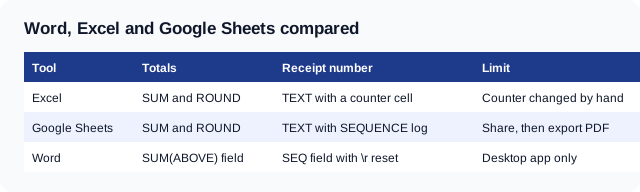
| Question | Excel | Google Sheets | Word |
|---|---|---|---|
| Totals calculate automatically | Yes, with formulas | Yes, with formulas | Yes, with a field you refresh |
| Receipt number | Counter cell and TEXT | Counter cell, TEXT and SEQUENCE | SEQ field, reset by hand |
| Works in a browser | Excel for the web | Yes | Field codes need the desktop app |
| Best for | Multi-line receipts | Shared, cloud templates | One-line receipts, fixed layout |
One limit decides the choice. Microsoft states that Word for the web does not support field codes, so a Word template with live totals needs the desktop app.
How do you create a receipt template in Excel?
To create a receipt template in Excel, lay out the header, a table of lines and a totals block, then enter four formulas that calculate every amount. The layout takes approximately ten minutes to prepare, and the formulas are what transform an ordinary form into a dependable, reusable template.
Step 1: set up the layout
Put the receipt number in cell B2 and the date in B3. Put the sales tax rate in B4, formatted as a percentage. Start the line table at row 7 with the headings Description, Qty, Unit price and Line total in columns A to D. Leave rows 8 to 17 for items. Put Subtotal, Sales tax and Total in rows 18 to 20.
Step 2: enter the four formulas
A formula is an instruction that begins with an equals sign and automatically recalculates whenever any cell it references is changed. These four do all the work.
| Cell | Formula | What it does |
|---|---|---|
| D8 (copy down to D17) | =ROUND(B8*C8,2) | Rounds each line to cents |
| D18 | =SUM(D8:D17) | Adds all line totals |
| D19 | =ROUND(D18*B4,2) | Calculates tax and rounds it |
| D20 | =D18+D19 | Gives the total received |
The first formula uses ROUND, which Microsoft documents as ROUND(number, num_digits), where a num_digits value of 2 rounds to two decimal places. Microsoft's own example is =ROUND(A1, 2), which turns 23.7825 into 23.78. The third uses Excel's SUM function, written SUM(number1,[number2],...), which adds a range such as D8:D17. Blank rows in that range add nothing, so a short receipt still totals correctly.
Round each line, not just the total. A cell can display 2 decimals while holding more, and the printed lines then fail to add up to the printed total by a cent. Wrapping each line in ROUND stores what the receipt shows.
Step 3: number each receipt
Excel cannot add one to a number each time you open a file without a macro. A counter cell you change by hand is the simplest safe method. Keep a second sheet named Log, copy the finished receipt number into it, and read the next number from the log.
Put this in B2 to format the number with a prefix and leading zeros:
="R-"&TEXT(Log!B1,"0000")
Microsoft's TEXT function page shows =TEXT(1234, "0000000") returning 0001234, so a counter of 42 with the format "0000" becomes 0042. In this setup Log!B1 holds the counter. After you issue a receipt, type the next number into Log!B1. The prefix means a number can never be confused with an invoice number.
Step 4: lock the formulas and save the file
Protect the cells that hold formulas so nobody types over them, and leave the input cells open. Save the file as a template, then open a copy for each receipt. Export each issued receipt to PDF so the numbers cannot change afterward.
How do you create a receipt template in Google Docs and Sheets?
To create a receipt template in Google Docs and Sheets, build the numbers in Google Sheets and copy the layout over to Google Docs only if you want a wordier page. Google Sheets uses the same ROUND, SUM and TEXT formulas as Excel, so the table in the previous section works cell for cell.
The difference is numbering. Google documents SEQUENCE as SEQUENCE(rows, columns, start, step), where start defaults to 1 and the result is an array of numbers. That lets you prefill a block of future receipt numbers.
On the Log sheet, put this in A2:
=SEQUENCE(50,1,1001,1)
It fills A2 to A51 with 1001 to 1050. Mark each used number in column B, for example with an X. On the receipt sheet, find the first unused number and format it:
="R-"&TEXT(INDEX(Log!A2:A51,MATCH("",Log!B2:B51,0)),"0000")
Google describes TEXT as TEXT(number, format), and its example shows that a 0 in the format forces zeros to display when a number has fewer digits. If you want a formula to fill a whole column at once, Google's ARRAYFORMULA wraps a range or expression so the result spills across several rows.
Two Sheets habits are worth keeping. First, make the receipt tab a copy of the file for each issue, not an edit of the same tab. Second, download each issued receipt as a PDF from the File menu, because a shared sheet can be edited after the fact.
How do you create a receipt template in Word?
To create a receipt template in Word, build a table for the items and use two field codes: one for the total and one for the receipt number. Word is the right tool when the layout matters and receipts are short. It is the wrong one for long itemized lists, since fields only refresh when you ask them to.
A field in Word is a placeholder that holds a calculated or automatic value, such as a sum or a page number. Microsoft says field codes work only in the desktop versions of Word for Windows and Mac.
Add a total that calculates
Click the last cell of the Line total column, open Insert, then Quick Parts, then Field, and choose the Formula field. Enter =SUM(ABOVE) and set a number format. Microsoft's numeric format switch example is { =SUM(ABOVE) \# $,0.00 }, which displays a result such as $4,455.70. After you type new line amounts, select the field and press F9 to refresh it.
Word has no ROUND-per-line step in this simple setup. Type each line total yourself, or keep the quantity times price in your head and enter the result. If a receipt needs sales tax computed on many lines, use Excel.
Add a receipt number that counts
Microsoft describes the Seq field as the field that sequentially numbers chapters, tables, figures and other items in a document. It counts inside one document only. A new copy of the template starts again at 1, which is the opposite of what a receipt book needs.
The fix is the reset switch. Microsoft's example, { SEQ figure \r 3 }, starts numbering at 3. For receipts, put the number you want in the switch:
{ SEQ receipt \r 1043 }
Before you save each issued receipt, change 1043 to the next number in your log. It is a manual step, and you should treat it as one. Never leave the reset at its old value, because two receipts would then carry the same number.
Save it so it stays a template
Save the finished file as a Word template, then open a new document from it for each receipt. Keep the template itself locked from editing, and send customers a PDF.
What does a filled-in receipt look like with real numbers?
A filled-in receipt shows every line, one rounded subtotal, one tax line and one total. The example below is a freelance photographer receiving payment on October 28, 2026, with an illustrative 6.5% sales tax rate. Your state rate may differ, so use your own.
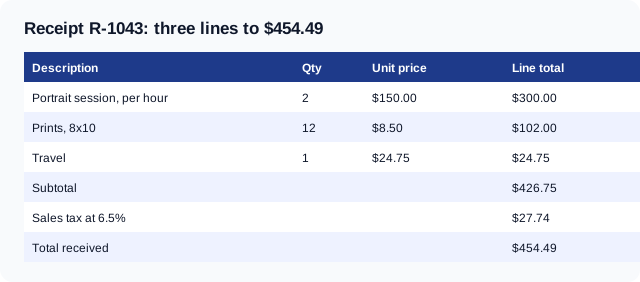
| Description | Qty | Unit price | Line total |
|---|---|---|---|
| Portrait session, per hour | 2 | $150.00 | $300.00 |
| Prints, 8x10 | 12 | $8.50 | $102.00 |
| Travel | 1 | $24.75 | $24.75 |
| Subtotal | $426.75 | ||
| Sales tax at 6.5% | $27.74 | ||
| Total received | $454.49 |
Every amount in this guide was recalculated with exact decimal arithmetic and checked against the vendor documentation linked beside each function, as part of the editorial fact-check for this article. The tax is $426.75 times 0.065, which is $27.73875, rounded to $27.74. The payment method line reads "Paid by card, ending 4417, on October 28, 2026". In Excel the cell D19 holds =ROUND(D18*B4,2) and returns 27.74.
Why do the cents sometimes disagree, and which way should you round?
The cents disagree when you round tax on each line and then add, because that can differ from rounding tax once on the subtotal. Pick one method for the whole template and never mix them. The one-line-at-a-time method is not wrong, but it must be consistent.
Here is a case where they split. Three items cost $0.70 each, taxed at 6.5%. Each line's tax is $0.0455, which rounds to $0.05, so three lines give $0.15. The subtotal is $2.10, and 6.5% of it is $0.1365, which rounds to $0.14. The receipt differs by one cent depending on the method.
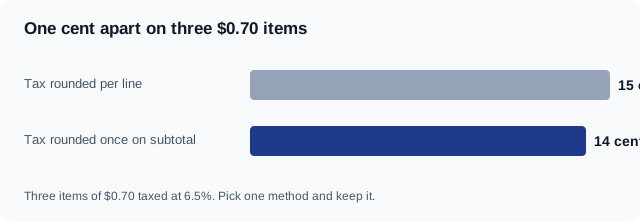
The template in this guide rounds tax once, on the subtotal. That keeps the tax line equal to the subtotal times the rate, which is the easiest thing for a customer to check. Rules on how sales tax must be rounded vary by state, so confirm yours with your state's revenue department before you rely on either method.
What mistakes break a receipt template?
Five mistakes cause nearly every problem with a home-made receipt template. Each one is cheap to prevent when the file is built, and expensive to fix after receipts have gone out.
- Overwritten formulas. Someone types a total over the formula. Protect the formula cells.
- Reused numbers. A copy of last month's file keeps last month's number. Read the next number from the log, never from memory. The post on receipt numbering covers where the number goes.
- Unrounded cells. A total displays 454.49 but stores 454.4875. Use ROUND as shown above.
- Editable files sent to customers. A Word or Excel file can be changed after you send it. Send a PDF.
- No saved copy. If you only email the receipt, you have no record. Save every PDF in one folder.
That last point matters for tax. The IRS, in Publication 583, lists receipt books, cash register tapes, invoices and credit card charge slips among the documents that show the amounts and sources of your gross receipts. The same publication says to keep records that support an item of income or deduction until the period of limitations for that return runs out. Its Table 3 gives 3 years in the usual case, and 6 years if you leave out income that is more than 25% of the gross income shown on the return. Your own situation may differ, so ask a tax professional what applies to you.
A checklist before you use the template
Run this list once, on a test receipt, before the first real one goes out.
- Enter three items and confirm the lines, subtotal, tax and total match a calculator.
- Enter a price with three decimals and confirm the line rounds to cents.
- Clear the item rows and confirm the total shows zero, not an error.
- Issue two receipts in a row and confirm the numbers differ.
- Export a PDF and confirm no formulas or comments show.
- Save the PDF with the receipt number in the file name.
For example, a file named R-1043-2026-10-28.pdf sorts correctly and answers the "which receipt was that" question without opening it.
When is a template not the right tool?
A template is the right tool for a few receipts a week. Once you issue many receipts, share the work with a second person, or need receipts to match invoices, a file starts to cost more than it saves. The numbering counter is the first thing to fail, because two people open the same file and both issue 1044.
At that point a generator that numbers, calculates and exports for you is simpler than maintaining formulas. Invoqk's receipt generator makes a numbered receipt and downloads it as a PDF, so the counter is no longer something you maintain.
Frequently asked questions
How do I create a receipt template in Excel?
Lay out a header, a table of items and a totals block. Then enter a ROUND formula for each line total, a SUM for the subtotal, a ROUND on the tax and an addition for the total. Add a counter cell with TEXT for the receipt number, and save the file as a template.
Can I create a receipt template in Google Docs?
You can build the layout in Google Docs, but the arithmetic belongs in Google Sheets, which supports ROUND, SUM, TEXT and SEQUENCE formulas. Build the receipt in Sheets, add a Log sheet for numbers, and download each issued receipt as a PDF so it cannot be edited later.
How do I number receipts automatically in Word?
Insert a SEQ field and use its reset switch, for example `{ SEQ receipt \r 1043 }`. Word's SEQ field counts only within one document, so each new copy starts again at 1 unless you reset it. Change the number by hand before saving each receipt.
Do I need a receipt number?
A receipt number is not a fixed legal requirement for every small receipt, but it lets you find and match records later. It is also the first thing a customer or bookkeeper asks for. A unique number per receipt, never reused, is the standard practice.
How long should I keep receipts I issue?
The IRS says to keep records that support income or deductions until the period of limitations for the return runs out. In Publication 583 that is generally 3 years, and 6 years if you omit income of more than 25% of the gross income on the return.
Comments
0No comments yet
Be the first to share your thoughts on this article.
Leave a comment
Your email is never published. Comments appear after approval.