

- A landscaping invoice needs your details, the client and job site, service dates, itemized labor and materials, any tax and a due date.
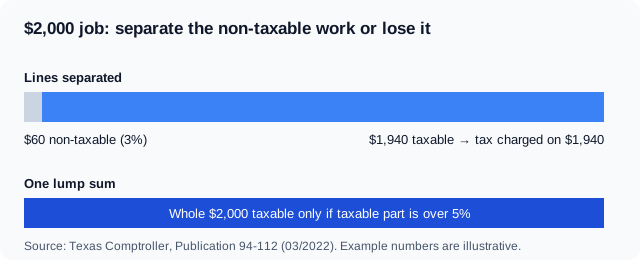
- The Texas Comptroller says landscaping and lawn care should collect sales tax, and non-taxable charges must be stated separately or the whole charge is presumed taxable above 5 percent.
- UK landscapers charge 20% VAT once taxable turnover over 12 months goes over £90,000, according to GOV.UK.
A landscaping invoice is a bill a landscaper sends after planting, mowing, mulching, hardscaping or maintenance work, listing the labor, materials and any tax owed. The fastest way to get paid is an invoice that separates labor from materials, names each visit or task, and shows a due date. Every figure below went through a fact-check against the official source linked beside it.
This guide gives you a landscaping invoice template you can copy, a filled-in lawn care example with real numbers, and the sales tax and VAT rules that change what you put on the page. It also covers a free landscape invoice form layout, a lawn mowing invoice for recurring clients and the mistakes that delay payment.
What goes on a landscaping invoice?
A landscaping invoice needs seven things: your business details, the client's details, a unique invoice number, the service date, itemized work, any tax, and the payment terms. Anything less invites a question from the client, and every question delays the payment. For the fields every invoice needs, see what to put on an invoice, and for sending it, the invoice email template. See also the contractor invoice template covers a related case.
Use this checklist as your template:
- Your business name, address, phone and tax ID. Add your sales tax permit number if your state requires one.
- The client's name and the job site address. For example, a homeowner may live somewhere other than the property you maintain.
- An invoice number and issue date. Number invoices in sequence so that both of you can find them later.
- Service dates. Name the visit, such as "Mowing, edging and blowing, October 6, 2026", not just "lawn service".
- Itemized labor and materials. Show hours or visits, a rate, plants and mulch by quantity, and disposal fees.
- Tax lines. Taxable and non-taxable work each get their own line.
- Total, due date and how to pay. State an exact date such as "Due: October 27, 2026".
Landscaping invoice template with a worked example
Below is a filled-in lawn service invoice for a one-time fall cleanup plus a seasonal planting. The numbers are illustrative, and the layout is what you copy.
<!-- ORIGINAL DATA: the sample invoice is a worked example built for this guide, with totals recalculated line by line. -->Invoice 2026-041 · Issued October 13, 2026 · Due October 27, 2026 Billed to: Maria Ortega, 118 Cedar Lane, Austin, Texas Job site: same as billing address
| Description | Qty | Rate | Amount |
|---|---|---|---|
| Fall cleanup: leaf removal, bed edging, pruning | 6 hrs | $55.00 | $330.00 |
| Mow, edge and blow, 3,200 sq ft lawn | 1 visit | $65.00 | $65.00 |
| Hardwood mulch, spread 2 inches deep | 4 cu yd | $48.00 | $192.00 |
| Autumn sage plants, 1-gallon | 12 | $11.00 | $132.00 |
| Green waste hauling and disposal | 1 | $40.00 | $40.00 |
| Subtotal | $759.00 | ||
| Sales tax (example rate 8.25%, whole subtotal) | $62.62 | ||
| Total due | $821.62 |
Three habits make this invoice hard to dispute. The mulch is billed by cubic yard so the client can check the delivery, the lawn size is stated so a repeat visit is priced the same way, and the disposal fee sits on its own line instead of hiding inside the labor rate.
A lawn mowing invoice for a recurring client works the same way, with one change. List each visit date as its own line, or send a monthly invoice that shows the four visit dates and a per-visit rate. A client who sees dates can match them against their own calendar.
Do you charge sales tax on landscaping services?
It depends on your state, and Texas shows how much it can matter. The Texas Comptroller's Publication 94-112 on landscaping and lawn care states that if you do landscaping or lawn or plant care, you should be collecting sales and use taxes. It treats planting, mowing, pruning and similar work as taxable services.
Many other US states tax this work differently or not at all. Check your own state comptroller or department of revenue before you copy a tax line from a template, because an invoice that collects tax you do not owe is as wrong as one that skips tax you do.
Why materials still carry tax on a Texas job
A resale certificate is a form a buyer gives a supplier so that goods bought to resell are purchased without sales tax. A landscaper can buy plants, fertilizer and mulch tax-free by giving the supplier one. The Texas Comptroller explains that these items are transferred to the customer as part of a taxable service, so you collect tax on the total charge, not on the materials alone. The worked example above follows that approach by taxing the whole subtotal.
The 5 percent rule for mixed jobs
The Texas Comptroller tells sellers to state non-taxable charges separately from taxable ones. If you do not, the publication says the total charge will be presumed taxable when the taxable portion is greater than 5 percent. A landscaper who clears a utility right-of-way (non-taxable) and mows a yard (taxable) on one job should therefore put each task on its own line.
What does a UK landscaping invoice need?
VAT is a tax charged on most goods and services in the UK, and a UK landscaper who is VAT registered must show the VAT on the invoice and charge it at the standard rate. GOV.UK sets the standard VAT rate at 20% for most goods and services, and landscaping work normally falls under it. Add your VAT number, the net amount, the VAT amount and the gross total.
A sole trader must register once taxable turnover passes the threshold. GOV.UK's VAT registration guidance says you must register if your total taxable turnover for the last 12 months goes over £90,000. Below that, you may still register voluntarily, and your invoice should then leave out any VAT line.
Use UK spelling and the pound sign on these invoices, and write dates in full, such as "27 October 2026", so no one reads the day and month the wrong way round.
Landscape invoice template line items by job type
The line items change with the work, so a template that fits a mowing round does not fit a patio build. Use these lists as a starting point and delete the lines you do not need.
Lawn care and maintenance
- Mowing, edging and blowing, per visit
- Fertilizer or weed treatment, per application
- Aeration and overseeding, per square foot
- Seasonal cleanup, per hour
Planting and softscape
- Trees, shrubs and flowers, by quantity and size
- Topsoil, mulch and gravel, by cubic yard
- Irrigation repairs, labor plus parts
Hardscape and design
- Design consultation, flat fee or hourly
- Patio, retaining wall or path, by square foot
- Equipment rental and delivery
- Debris removal and disposal
If you charge a deposit for plants or stone, show it as a credit line, for example "Deposit received September 29, 2026: -$300.00". The deposit then reduces the balance without confusing the client about the full price.
Free landscaping invoice template: a layout you can reuse
A free landscape invoice form needs fewer fields than people expect. The goal is a one-page document that a client can read at a glance, so keep the header, the table and the payment block, and nothing else.
- Header: your logo, business details and the word "Invoice".
- Bill-to block: client name, job site and invoice number.
- Line-item table: description, quantity, rate and amount.
- Totals block: subtotal, tax, deposits and the amount due.
- Payment block: due date, accepted methods and late-fee terms.
You can build this in a word processor or a spreadsheet, but a generator saves the retyping and does the tax maths. Invoqk's invoice generator turns a plain description such as "fall cleanup, 6 hours, 4 yards of mulch, 12 plants" into an itemized invoice with a PDF you can email.
What payment terms should a landscaping invoice carry?
A payment term is the date and conditions under which a client must pay, and it belongs in the footer of every landscaping invoice. In the UK, GOV.UK says a business payment date must usually fall within 60 days, and if you agree no date, payment is late 30 days after the customer receives the invoice or 30 days after the work, whichever is later, according to GOV.UK on late commercial payments.
In the United States, the term is whatever your contract says, so write it down. A short line such as "Net 14, due October 27, 2026; 1.5% monthly fee on balances over 14 days late" gives you something to point to if a homeowner pays late. Only include a late fee if your signed estimate or agreement mentions it first.
<!-- UNIQUE INSIGHT: pairing the UK default lateness rule with a US contract-based late-fee line shows one invoice footer that works on both sides of the Atlantic. -->Mistakes that delay landscaping payments
- Lumping everything into one price. A single line called "yard work" gives the client nothing to check and, in a state like Texas, can make a non-taxable part taxable.
- Billing materials without quantities. "Mulch" is a question; "4 cu yd hardwood mulch" is an answer.
- Skipping the job-site address. Property managers and landlords often pay for jobs at addresses they do not live at.
- No due date. Net 14 or Net 30 means nothing without the date on the page.
- Forgetting seasonal terms. Tell recurring clients when a monthly invoice is sent, because the bill that arrives in winter is the one most easily forgotten.
The bottom line: itemize the work, separate taxable from non-taxable lines, show materials by quantity, and put a due date on the page. This guide describes common rules and is not tax advice for your business, so contact your state tax office or an accountant before you set up your tax lines.
Frequently asked questions
What should a landscaping invoice include?
A landscaping invoice should include your business details, the client and job site, an invoice number, service dates, itemized labor and materials, any tax and the due date. Showing quantities for plants and mulch lets the client check the delivery before paying.
Is landscaping taxable in Texas?
Yes. The Texas Comptroller says anyone doing landscaping or lawn or plant care should collect sales and use taxes. Non-taxable charges must be stated separately, or the whole charge is presumed taxable if the taxable portion is more than 5 percent.
How do I invoice a lawn mowing client every month?
List each mowing date as its own line with a per-visit rate, or send a monthly invoice that shows the visit dates. Repeat the same service description each month, add a due date, and keep invoice numbers in sequence so that totals are easy to reconcile.
Do UK landscapers charge VAT?
A UK landscaper charges VAT once registered, which is required when taxable turnover for the last 12 months goes over £90,000, according to GOV.UK. The standard rate is 20%. Below the threshold, registration is optional and no VAT line appears on the invoice.
Where can I get a free landscaping invoice template?
You can copy the layout in this guide into a word processor or spreadsheet, or use an invoice generator that builds the itemized table for you. Whichever you choose, keep the header, line-item table, totals and payment block, and add your tax lines for your state.
Comments
0No comments yet
Be the first to share your thoughts on this article.
Leave a comment
Your email is never published. Comments appear after approval.