

- Free purchase order software creates numbered purchase orders, stores supplier details and exports a PDF, but free tiers usually cap users, approvals and reports.
- Below about 10 purchase orders a month a template or spreadsheet is enough, between 10 and 40 a free generator saves time, and above that a full system pays for itself.
- The control that matters most is the three-way match of purchase order, delivery record and supplier invoice, which stops you paying for goods you did not receive.
A purchase order protects the buyer before money moves. It says what you ordered, at what price, and on what terms, so the supplier invoice can be checked against it. Free purchase order software promises to do this without a monthly fee. Sometimes it does. Sometimes a spreadsheet does the same job and the software only adds a login. This guide shows what free purchase order software actually does, where free tiers stop, and a rule for choosing by how many purchase orders you raise each month.
In brief: under about 10 purchase orders a month, use a template or spreadsheet. From 10 to 40, a free online generator saves real time. Above 40, or when several people must approve spending, a full purchase order system is worth paying for. Whatever you choose, match the order, the delivery and the invoice before you pay.
What is free purchase order software?
Free purchase order software is a program that creates, numbers and stores purchase orders without a subscription fee. A purchase order is a document a buyer sends to a supplier that lists the goods or services wanted, the agreed price and the delivery and payment terms.
The software ranges from a one-page online generator to a limited tier of a full procurement system. Names vary: a free purchase order system, a purchase order program, an online PO or an online PO system. They all do the same core job. They differ in how many users, orders and extras the free version allows.
What can free purchase order software do?
Most free tools cover the same five tasks. Check each one before you commit, because a tool that misses one of them sends you back to a spreadsheet.
| Feature | What to check |
|---|---|
| Automatic PO numbers | Does each order get a unique number in sequence? |
| Saved suppliers and items | Can you reuse supplier details and prices? |
| Tax, shipping and totals | Do the totals add up without manual math? |
| PDF export or email | Is the PDF free of a vendor watermark? |
| Order status | Can you mark an order as sent, received or closed? |
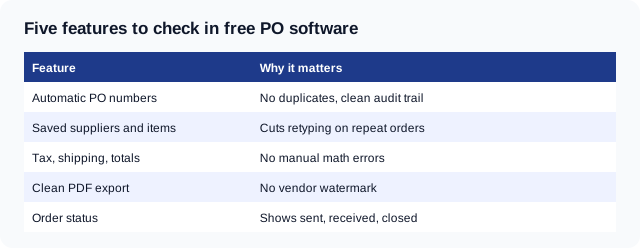
If a tool offers all five, it is enough for most small buyers. Anything more is a bonus, not a need.
What do free online PO systems usually cap?
Free tiers make money from the limits. Knowing the limits before you build habits around a tool saves a painful move later. The usual caps are below.
| Limit | Why it matters |
|---|---|
| One user | A second buyer cannot raise orders |
| A cap on orders a month | You stop at the limit, often mid-month |
| No approval workflow | Anyone can send any order |
| No goods-received record | You cannot match delivery to invoice |
| Basic or no reports | You cannot see spend by supplier |
| Branding on the PDF | The supplier sees the vendor's logo |
None of these is a problem for a one-person business with a few orders. Several become real problems as soon as a second person can spend money.
Is a template enough for a purchase order?
Yes, while you raise few orders and one person buys. A purchase order template in a word processor or spreadsheet holds the same fields as software. The cost is time, and the risk is human error: a repeated PO number, a wrong total or a lost file.
A template works when:
- You raise fewer than about 10 purchase orders a month.
- One person places every order.
- You do not need an approval before spending.
- You keep the signed orders in one folder you can find.
The Invoqk purchase order template shows the fields to include. Copy it into a spreadsheet and you have a working system for a very small business.
How many purchase orders a month justify a tool?
The rule below uses volume as the main test. It is a rule of thumb, not a published standard, so adjust it to how much time a single order costs you.
| POs per month | Best option | Why |
|---|---|---|
| Under 10 | Template or spreadsheet | Setup costs more than it saves |
| 10 to 40 | Free online generator | Saved suppliers and automatic numbers |
| Over 40 | Full purchase order system | Approvals, receiving, reporting |
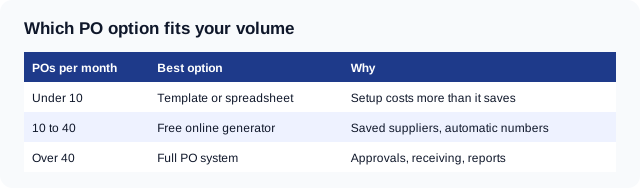
Two other facts can override the volume rule. If several people can spend, you need approvals sooner. If orders are large, you need a record of delivery sooner. A business with five orders a month at $20,000 each needs more control than one with fifty orders at $40.
What is a three-way match, and why does it matter?
A three-way match is a check that the purchase order, the goods-received record and the supplier invoice agree on quantity and price before you pay. It is the single most useful control a purchase order gives you, and the one free tools most often leave out.
Here is how it works in practice. The purchase order says what you agreed to buy. The goods-received record says what actually arrived. The invoice says what the supplier wants to be paid. If any of the three disagrees, you pause the payment and ask why.
For example, a landscaping business orders 40 cubic yards of mulch at $38.00 a yard. The supplier delivers 38 yards and invoices for 40.
| Document | Quantity | Price | Amount |
|---|---|---|---|
| Purchase order | 40 yards | $38.00 | $1,520.00 |
| Goods received | 38 yards | $38.00 | $1,444.00 |
| Supplier invoice | 40 yards | $38.00 | $1,520.00 |
The invoice is $76.00 higher than what arrived. A buyer who pays the invoice without the delivery record loses $76.00. A buyer who matches the three documents asks the supplier for a credit note or the missing two yards.
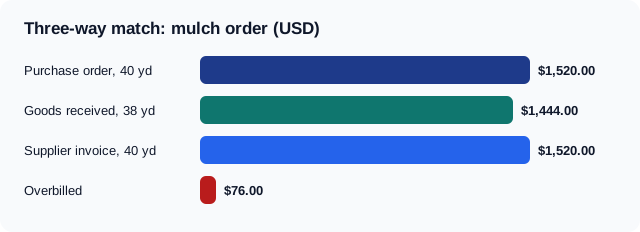
A free generator often stops at document one. If you need the match, you can record received quantities in a simple spreadsheet column next to each order. That is crude, and it works.
What should a purchase order include?
A purchase order needs the same core fields every time. A missing field is the usual reason a supplier phones to ask a question or ships the wrong item. The list below applies in the United States and works elsewhere with local tax wording.
- Your business name, address and contact.
- The supplier's name and address.
- A unique PO number and the order date.
- A description, quantity and unit price for each line.
- Tax, shipping and the total.
- The delivery address and the delivery date.
- The payment terms, such as Net 30.
- A name or signature that shows who approved the order.
A worked purchase order you can copy
The example below is a small landscaping business ordering supplies in the United States. The tax rate is an illustration, so use the rate that applies to your order.
| Field | Example |
|---|---|
| PO number | PO-2026-0147 |
| Order date | October 28, 2026 |
| Buyer | Birch Lane Landscaping, 41 Mill Road, Columbus, OH 43215 |
| Supplier | Northfield Garden Supply |
| Mulch | 40 cubic yards at $38.00 = $1,520.00 |
| Topsoil | 25 cubic yards at $44.00 = $1,100.00 |
| Edging | 20 pieces at $9.50 = $190.00 |
| Goods subtotal | $2,810.00 |
| Sales tax at 6.5 percent on goods | $182.65 |
| Shipping | $85.00 |
| Total | $3,077.65 |
| Delivery | November 12, 2026, to the job site |
| Payment terms | Net 30 from the invoice date |
| Approved by | S. Wells |
Check the arithmetic: $1,520.00 + $1,100.00 + $190.00 = $2,810.00. Then $2,810.00 × 0.065 = $182.65, and $2,810.00 + $182.65 + $85.00 = $3,077.65.
Free online purchase order software or a generator?
A free online purchase order generator builds one document at a time. A free online purchase order software tier adds a database of suppliers, orders and statuses. For a small business, a generator is often the simpler first step. For the document itself, see how to create a purchase order online for free and a purchase order sample with a worked example.
Invoqk's purchase order generator turns a short description of the order into a finished purchase order with a PDF, and it is free to use. It does not replace a full procurement system. It replaces the blank spreadsheet.
Choose a generator when you want a clean document in a minute. Choose software when you need a history of orders by supplier. Choose a full system when you need approvals and a receiving step.
When do free tiers stop being enough?
Free tiers stop being enough when control matters more than convenience. The signs are clear and tend to arrive together.
| Need | Why free tiers struggle |
|---|---|
| Several people raise orders | Single-user limits |
| Approval before sending | Approval workflows are a paid feature |
| Match delivery to invoice | Receiving records are not included |
| Spend by supplier or project | Reports are limited or absent |
| Sync with accounting | Integrations are paid |
| Budget limits per department | Budget control is a paid feature |
If two or three rows describe you, it is time to compare a paid system. The cost of the software is usually smaller than one mistake that goes through unchecked.
How do you test a free PO tool in 30 minutes?
Test any tool with a real order before you trust it. A demo with sample data hides the problems that appear with your own suppliers and tax lines. Follow the steps below.
- Create an account and add one real supplier.
- Raise a purchase order with three lines, tax and shipping.
- Check that the total matches your own arithmetic.
- Export the PDF and look for a vendor watermark.
- Mark the order as received and then closed.
- Try to export your data, in case you leave.
If any step takes longer than the same task in a spreadsheet, the tool is not saving you time.
Common mistakes when you choose a PO system
Most poor choices come from buying features nobody uses. Check your shortlist against this list.
- Paying for approvals nobody needs. A one-person business does not need a workflow.
- Ignoring export. If you cannot export your orders, you are locked in.
- No receiving step. Without it, there is nothing to match the invoice against.
- Reusing PO numbers. Duplicate numbers break the audit trail.
- Verbal orders. Anything not on a purchase order is hard to dispute later.
- Skipping the signature or approver. An order nobody approved is an order nobody owns.
What to skip in a feature list
Vendors list dozens of features. Most small buyers need only a few. The extras below look impressive and rarely matter at small scale.
- Custom approval chains with many levels.
- Supplier portals, unless your suppliers ask for one.
- Multi-currency, unless you buy abroad.
- Contract management, unless you sign long contracts.
- Mobile apps, if you raise orders at a desk.
Add them later when the need appears, not before.
Purchase order first, then the bill
A purchase order is the start of a chain. The supplier delivers, then sends an invoice, then you pay. If you also sell, the same logic applies in reverse: your customer's purchase order is the document you invoice against. A mismatch between the order and your invoice is a common reason customers delay payment.
When you receive an order from a customer, copy the PO number onto your invoice so their accounts team can match the two. Invoqk's invoice generator has a reference field, so the customer's PO number carries through to the finished document.
Frequently asked questions
What is the best free purchase order software?
The best option is the one that fits your volume and your must-have features. Below 10 orders a month a template is enough. Between 10 and 40, a free online generator is usually best. Above that, test a paid system.
Is a spreadsheet enough instead of purchase order software?
Yes, for a very small business with one buyer and few orders. Add a column for received quantities and keep PO numbers in sequence. Move to software when a second person spends money or orders grow.
Can I create purchase orders online for free?
Yes. A free online purchase order generator creates a numbered document you can download as a PDF. Check that the PDF has no vendor watermark and that you can export your data.
Do free PO tools include approvals?
Rarely. Approval workflows are usually a paid feature. If you need a second person to approve spending, use a signature line on the order or move to a paid system.
What is the difference between a purchase order and an invoice?
A purchase order comes from the buyer before delivery and states what is wanted. An invoice comes from the seller after delivery and asks for payment. Matching the two before you pay prevents overpayment.
Comments
0No comments yet
Be the first to share your thoughts on this article.
Leave a comment
Your email is never published. Comments appear after approval.