

- Making Tax Digital for Income Tax is required from April 6, 2027 if your 2025 to 2026 qualifying income is above £30,000, according to GOV.UK.
- Qualifying income is turnover before expenses, so a freelancer with £34,500 of invoices and £23,300 of profit is in scope.
- Records need only the amount, the date and the Self Assessment category, and quarterly updates are summaries sent through HMRC-recognised software.
Making Tax Digital for Income Tax is required from April 6, 2027 if your 2025 to 2026 qualifying income is above £30,000. Qualifying income means turnover before expenses, not profit. A freelancer who invoices £34,500 and keeps £23,300 is inside the rule. This guide shows how to run the test with your own invoices, what records you must keep and what changes in 2028.
What is Making Tax Digital for Income Tax?
Making Tax Digital for Income Tax is an HMRC requirement to keep digital records and send quarterly updates of self-employment and property income. HMRC says the updates are "totals of your self-employment and property income and expenses". They are summaries, not tax returns. You still file a tax return by January 31 after the tax year ends, according to the Use Making Tax Digital for Income Tax guidance. Self Assessment is the HMRC system through which UK sole traders and landlords report income and pay income tax. Related: what a tax invoice must show, what to put on an invoice.
The scheme applies to people already registered for Self Assessment who have submitted a return. It covers sole traders and landlords. HMRC says around 1,077,000 more sole traders and landlords must create digital records from April 6, 2027, in its October 5, 2026 announcement.
This post covers the UK only. It does not cover VAT, partnerships or the trading allowance, because the GOV.UK pages checked for this guide do not address them. Check HMRC guidance for those cases.
Does the £30,000 test use profit or turnover?
The £30,000 test uses turnover, which is your total income before expenses. The GOV.UK introduction to Making Tax Digital for Income Tax states: "Qualifying income is your total turnover from self-employment and property income. This is the total amount before expenses, based on the tax return you submitted in the previous tax year."
Profit does not matter for the test. A freelancer with high costs can have a small profit and still be over the threshold. HMRC's October 5, 2026 announcement repeats the point: turnover is gross income "before any tax allowances or expenses are deducted".
Employment income and pension income do not count. Only self-employment and property income count toward the figure.
Which tax year decides whether you must join?
The 2025 to 2026 tax year decides whether you must join on April 6, 2027. That is the year from April 6, 2025 to April 5, 2026. The figure comes from the Self Assessment return you filed for that year, according to the GOV.UK phase table. The £30,000 test can include you even when your profit is low.
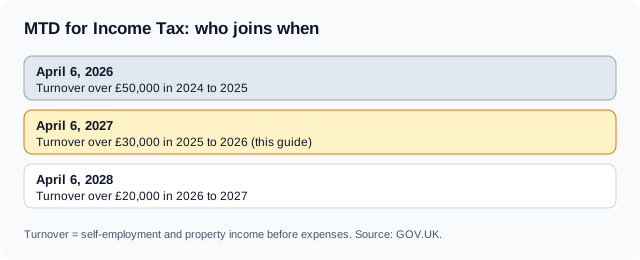
HMRC phases the rule in by income level. Each phase looks at a different earlier year.
| Start date | Tax year that decides | Qualifying income test |
|---|---|---|
| April 6, 2026 | 2024 to 2025 | More than £50,000 |
| April 6, 2027 | 2025 to 2026 | More than £30,000 |
| April 6, 2028 | 2026 to 2027 | More than £20,000 |
If you were below £50,000 in 2024 to 2025, you were not in the first phase. You may still be in the second. If you are over £20,000 but under £30,000 in 2025 to 2026, you are not required in 2027. You are likely to be in scope in 2028 if your 2026 to 2027 turnover is above £20,000.
The tax return you submit for 2025 to 2026 is the document HMRC points to. Use the turnover figure on that return when you run the test, not a figure from bank statements.
How do you run the £30,000 test with your invoices?
Add up the self-employment turnover for April 6, 2025 to April 5, 2026. Add any property income turnover. If the total is above £30,000, you are in scope from April 6, 2027.
Follow these steps:
- List every invoice and receipt for the 2025 to 2026 tax year.
- Total the self-employment amounts before any expense.
- Add gross property income if you have any.
- Compare the total with £30,000.
- Check the figure against the turnover boxes on your submitted return.
An invoice total that includes VAT is a special case. The GOV.UK pages checked for this guide do not say how VAT-inclusive figures are treated. If you are VAT-registered, confirm the treatment with HMRC before you rely on your result.
Three worked examples
The numbers below are illustrative. They are not HMRC figures.
Freelancer A, a designer. A invoiced £34,500 in 2025 to 2026 and had £11,200 of costs. Profit was £23,300. Turnover is above £30,000, so A must use Making Tax Digital for Income Tax from April 6, 2027.
Freelancer B, a copywriter. B invoiced £29,400 and had £8,400 of costs. Profit was £21,000. Turnover is below £30,000, so B is not required in 2027. B can sign up voluntarily.
Freelancer C, a consultant with a rental flat. C invoiced £18,000 for consulting and received £14,000 in rent. The total is £32,000, which is above £30,000. C is in scope because self-employment and property turnover are added together.
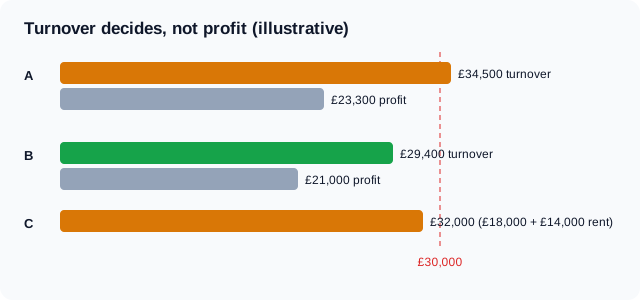
Freelancer B is the closest call. A small increase in 2026 to 2027 could pull B into the £20,000 phase in April 2028.
What digital records does Making Tax Digital require?
You must record the amount, the date and the category of each item of income and each expense. GOV.UK states: "When you create a record, you'll need the: amount; date income was received or expenses occurred; category of your income or expense (using the same categories as you would for Self Assessment)."
These are the only fields GOV.UK lists. Making Tax Digital for Income Tax does not ask for a client name, an invoice number or a VAT breakdown in the record. Your invoices still need those details for other reasons, such as a client's accounts team and your own bookkeeping.
The record date for income is the date income was received. An invoice has two dates: the issue date and the payment date. Keep both, and record the one HMRC asks for.
| Invoice detail | Making Tax Digital record field |
|---|---|
| Total amount | Amount |
| Date the client paid | Date income was received |
| Type of work, such as consulting fees | Category from Self Assessment |
| Client name | Not required by HMRC |
| Invoice number | Not required by HMRC |
An invoice number is still the easiest way to match a payment to a record. What is an invoice number? A unique reference for one invoice, and a clean numbering scheme saves hours when you reconcile quarterly.
What are quarterly updates and when are they due?
A quarterly update is a summary of income and expenses for a three-month period, sent through HMRC-recognised software. GOV.UK states you must send updates "every 3 months during the tax year for each sole trader business and property business you have".
HMRC's published dates for the 2026 to 2027 tax year are:
| Update | Deadline |
|---|---|
| First quarterly update | August 7, 2026 |
| Second quarterly update | November 7, 2026 |
| Third quarterly update | February 7, 2027 |
| Fourth quarterly update | May 7, 2027 |
Those dates apply to people in the first phase, who started on April 6, 2026. The GOV.UK pages checked for this guide do not publish a separate date table for the April 2027 group. Check your HMRC online account for your own deadlines.
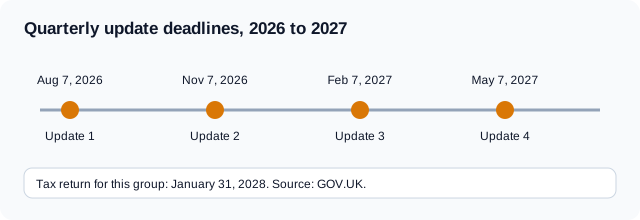
The final return still follows the usual rule. For the first phase, HMRC lists the tax return deadline as January 31, 2028.
What happens if you send a quarterly update late?
You receive a penalty point, not an immediate penalty. GOV.UK states: "If you're late sending a quarterly update or submitting your tax return, you will not get a penalty straight away. Instead, you'll get a penalty point. If you reach the point threshold, you'll get a penalty."
HMRC also states: "We will not apply penalty points for late quarterly updates for the 2026 to 2027 tax year." You still need to send quarterly updates before you can submit your tax return.
The GOV.UK pages checked for this guide do not give the number of points that triggers a penalty. They also do not give the start date of penalty points for the 2027 group. Do not rely on a figure from a blog without finding it on GOV.UK.
Late payment penalties are separate. HMRC says the new late payment penalties are more proportionate to how long you take to pay, and the sooner you pay, the lower the penalty.
Can you join Making Tax Digital early?
Yes. People below £30,000 can sign up voluntarily, according to GOV.UK. To sign up, you must be registered for Self Assessment and have submitted a tax return in the last two years. Agents can also sign up clients on GOV.UK.
Joining early can make sense if you already keep records in accounting software. Joining early also means you take on quarterly updates sooner than the law requires. Weigh the extra admin against any benefit before you opt in.
Who can be exempt from Making Tax Digital?
Some people are exempt, including people who are digitally excluded. GOV.UK states there are "certain exemptions from Making Tax Digital for Income Tax, including for those who are digitally excluded". HMRC publishes a separate exemption application page.
A policy paper on extending Making Tax Digital from September 2, 2025 says exemptions mirror those for Making Tax Digital for VAT. If you already have an exemption from digital VAT filing, you are exempt for Income Tax as well.
This guide does not decide whether an exemption fits your situation. That depends on facts a post cannot know. Read the HMRC exemption guidance or ask an accountant.
How should a freelancer prepare before April 6, 2027?
Start with your invoices, because they are the source of your income records. Work through this checklist before the start date:
- Run the £30,000 test with 2025 to 2026 turnover.
- Choose HMRC-recognised software that links to your invoices and bank feed.
- Number every invoice in a single sequence.
- Record the payment date for each invoice, not only the issue date.
- Tag each expense with a Self Assessment category as you go.
- Put the quarterly deadlines in your calendar.
- Sign up on GOV.UK once your software is ready.
Software is the practical change for most freelancers. A spreadsheet alone is not enough for sending quarterly updates, because updates must go through HMRC-recognised software. If you keep a spreadsheet, check that your software is on HMRC's list of recognised products.
Clean invoices make every other step faster. An invoice that shows the amount, the issue date, the due date and a clear description maps straight onto a record. Invoqk's invoice generator creates invoices with those fields, and you can download them as PDFs or send them by email.
Which mistakes cost the most?
Three mistakes show up again and again in the sources.
- Testing profit instead of turnover. This gets freelancer A wrong. Costs do not reduce the figure.
- Forgetting property income. Freelancer C passes the test only after adding rent.
- Using the wrong tax year. The 2027 test looks at 2025 to 2026, not at the year you are in now.
A fourth risk is relying on a rule from a secondary source. Several sites repeat numbers about penalty points that GOV.UK does not state. Read the guidance on GOV.UK before you change your process.
What changes in April 2028?
The threshold falls to £20,000 from April 6, 2028, according to GOV.UK. The deciding year is 2026 to 2027. Freelancers with turnover between £20,000 and £30,000 in that year are the group that joins.
If you are in that band now, you have more than a year to prepare. You can use the time to pick software, tidy your invoice numbering and test a quarterly update on a voluntary basis. Freelancer B in the examples above is exactly this case.
This guide was fact-checked against GOV.UK pages published or updated between September 2025 and October 16, 2026. HMRC can change dates and figures, so check the pages before you act. If a rule has changed since, contact us through the Invoqk site and the editorial team will correct this page.
Frequently asked questions
Do I need Making Tax Digital if I earn under £30,000?
No, not from April 6, 2027, if your 2025 to 2026 turnover is £30,000 or less. GOV.UK says you can sign up voluntarily. The threshold falls to £20,000 from April 6, 2028, so check again in 2028.
Is the £30,000 limit based on profit or turnover?
It is based on turnover, which is income before expenses. GOV.UK defines qualifying income as total turnover from self-employment and property income before expenses. A profit of £21,000 can still sit above the limit if turnover is £34,000.
Do I send a copy of each invoice to HMRC?
No. Quarterly updates are totals of income and expenses. GOV.UK describes them as summaries, not tax returns. You must keep a digital record of each item with the amount, the date and the category.
Can I use a spreadsheet for Making Tax Digital?
You can keep records in a spreadsheet, but quarterly updates must go through HMRC-recognised software. GOV.UK states updates need recognised software. Check that your spreadsheet tool or bridging product is approved before the first deadline.
Will I get a penalty if I send a quarterly update late?
You get a penalty point, not an immediate fine. HMRC says it will not apply points for late quarterly updates in the 2026 to 2027 tax year. Late tax payments carry separate penalties that grow with the delay.
Comments
0No comments yet
Be the first to share your thoughts on this article.
Leave a comment
Your email is never published. Comments appear after approval.