

- Free quoting software builds a priced quote from saved clients and items, adds tax and a deposit, and exports a PDF, which saves most of the time a quote takes.
- Free plans usually limit the number of quotes, add a watermark, or hold back acceptance tracking, so check those three things before you rely on one.
- Under about 5 quotes a month a plain template is enough, from 5 to 20 a free quoting tool pays off, and above 20 you should look at paid software.
Free quoting software: what it does and when to skip it
In brief: free quoting software turns saved clients and price items into a finished quote in a few minutes. It pays for itself once you send roughly 5 or more quotes a month, and a plain template is enough below that. This guide gives you a feature checklist, a decision rule by volume, and a worked quote you can copy.
Free quoting software is a program, usually web-based, that builds a priced offer for a client from saved customers, saved line items, tax and terms, and exports it as a PDF or a link. The word "free" covers a wide range. Some tools are free forever with limits. Some are free for a trial period. Some give the quote away and charge for the invoice that follows.
This post is for US freelancers, contractors and small-business owners who price work before they do it. It does not cover enterprise CPQ systems, which exist for companies with product catalogs and sales teams.
What does free quoting software actually do?
Free quoting software does five jobs: it stores your clients, stores your price items, calculates totals, produces a clean document, and tracks what happens next. A quote built this way takes minutes instead of the 20 minutes many people spend retyping a Word file.
Here is each job in plain terms.
- Stores clients. You enter a client one time, and the next quote automatically retrieves the name, address and email.
- Stores items. A line such as "Deck framing labor, 1 hour, $65" is saved with its price. You select it and adjust the quantity as needed.
- Calculates totals. The tool adds the lines, applies a discount, calculates sales tax and works out a deposit, so you never need a separate calculator.
- Produces the document. You get a PDF or a link with your logo, a quote number and an expiry date.
- Tracks the outcome. Better tools show when the client opened the quote and let them accept it online.
The first four jobs are the core functionality, and almost every free tool performs them. The fifth job, tracking, is where free plans differ the most.
Free quoting software vs a quote template: what is the difference?
A quote template is a fixed document, such as a Word, Excel or Google Docs file, that you copy and fill in by hand. Free quoting software does the same job but remembers your data. The template wins on simplicity. The software wins on speed and consistency.
| Point | Quote template | Free quoting software |
|---|---|---|
| Setup time | Minutes | 20 to 40 minutes |
| Cost | Free | Free, with limits |
| Saved clients and items | No | Yes |
| Automatic quote numbers | No, you type them | Yes |
| Math errors | Possible | Rare |
| Client acceptance record | Email reply | Often built in |
| Quote to invoice | Retype | One click on better tools |
| Works offline | Yes | Usually not |
The honest answer is that neither approach is universally better, because the right choice depends on how many quotes you send, and a later section converts that volume into a practical rule.
If you only need a layout today, the quote template page at Invoqk quote template gives you a filled-in structure to copy. The longer guide on what a quote must contain is in the post "Quote template: what to include, with a free example".
What should a good free quoting tool include?
A good free quoting tool saves your clients and items, calculates tax and discounts, exports a PDF without a watermark, converts an accepted quote into an invoice, and records acceptance. Those five features cover what matters. Anything beyond them is a bonus.
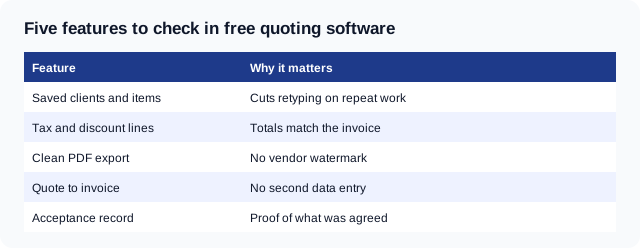
Each feature earns its place for a reason you can test in ten minutes.
Saved clients and items
Repeat work is where most of the time disappears. If you quote similar jobs, saved items cut the time per quote by about two thirds in the example used later in this post. Test this directly by creating a quote, then making a second one for the same client and observing how much information you must retype.
Tax and discount lines
A sales tax line is a separate amount added to a quote when the work or goods are taxable in your state. Rules differ by state and by whether labor is taxable, so the tool must let you set the rate and choose which lines it applies to. A tool that applies one rate to everything is wrong for any job that mixes taxable materials with non-taxable labor.
Clean PDF export
Many free plans stamp a logo or "created with" line on the PDF. That is acceptable for a private estimate. It looks poor on a quote to a commercial client. Export a test PDF before you commit to any particular tool.
Quote to invoice
A quote-to-invoice feature copies an accepted quote into an invoice with the same lines and totals. Without it you retype every line, which is where typos creep in and where a final bill stops matching the agreed price. If the tool cannot do this, plan to use a separate invoice generator and copy the lines yourself.
Acceptance record
An acceptance record is proof that the client agreed to the quote, ideally with a date and a name. It matters when a client later disputes the price. Even an emailed "Approved" counts as a record, but a tool that stores it with the quote is better.
What do free plans usually leave out?
Free plans usually cap the number of quotes, watermark the PDF, and keep acceptance tracking, reminders and integrations for paid tiers. Vendors change these limits often, so read the current pricing page rather than trusting a review from last year.
Check these six limits before you sign up:
- A monthly quote cap. Some free plans stop at a small number of quotes.
- A watermark or branding line on the PDF.
- One user only. Fine for a freelancer, a problem for a crew.
- No custom terms. You may not be able to edit the payment terms or add a deposit clause.
- No export of your data. If you leave, can you take your clients and items with you?
- Mandatory card on file. Some "free" plans require a card for a trial.
The data export question is the one people forget. Your saved items and client list are the real asset. A tool that locks them in is not free in any sense that matters.
When is a template enough, and when do you need software?
A template is enough when you send fewer than about 5 quotes a month, a free quoting tool pays off from 5 to 20 a month, and above 20 a month paid software with approvals and reporting is worth looking at. These thresholds are a rule of thumb, not a law. Move them if your quotes are unusually long or short.
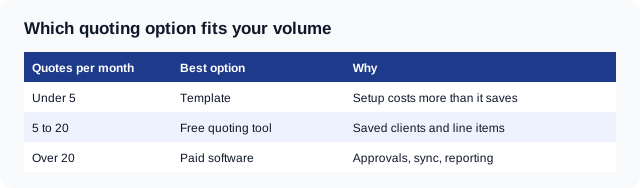
The rule works because of one number: how long a quote takes you.
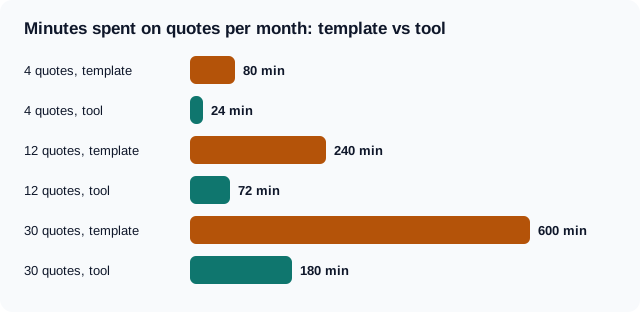
The chart assumes 20 minutes per quote from a template and 6 minutes per quote from a tool with saved items. Those figures are illustrative, so time your own next three quotes and replace them. At 4 quotes a month the difference is 56 minutes, which does not justify a new tool. At 12 quotes it is 168 minutes. At 30 quotes it is 420 minutes, which is a full working day.
Add two more tests to the volume rule:
- If your quotes repeat, move toward software sooner. Ten identical-style quotes save more than ten unique ones.
- If a quote needs a site visit, a long scope or custom pricing, the typing is not the bottleneck. Thinking is. Software helps less, and a template is fine.
For the price itself, the markup calculator shows what margin a given cost and price leave you. It is worth running before you save an item at a fixed rate.
A worked example: one quote, built step by step
A worked quote shows how the pieces fit. This example is a deck repair for a US residential client. The state sales tax rate is assumed at 6% on materials only, and labor is treated as non-taxable. Check your own state's rule before copying the tax line.
| Item | Qty | Unit price | Amount |
|---|---|---|---|
| Framing and decking labor (hours) | 24 | $65.00 | $1,560.00 |
| Lumber, fasteners and stain (materials) | 1 | $2,340.00 | $2,340.00 |
| Permit handling (flat fee) | 1 | $150.00 | $150.00 |
| Subtotal | $4,050.00 | ||
| Sales tax, 6% on materials ($2,340.00) | $140.40 | ||
| Quote total | $4,190.40 | ||
| Deposit due on acceptance, 30% | $1,257.12 | ||
| Balance due on completion | $2,933.28 |
The quote carries a number such as Q-0142, an issue date, and a line reading "Valid for 30 days from the issue date." The sales tax is 6% of $2,340.00, which is $140.40. The deposit is 30% of $4,190.40, which is $1,257.12. The balance is the total minus the deposit, which is $2,933.28.
Build the same quote in the free Invoqk quote generator by pasting the job description. The tool structures the lines, and you check the rate and the totals before sending.
How long should a quote stay valid?
Set an explicit expiry date on every quote, and 30 days is a common default for services. A quote with no end date can be accepted a year later at a price that no longer covers your costs. The date is also what turns a quote from a vague number into an offer with a deadline.
For sellers of goods there is a legal angle. Under UCC section 2-205, a merchant's offer to buy or sell goods that is in a signed writing and promises to stay open cannot be revoked during the stated time. It also says that period cannot exceed three months. If no time is stated, the offer stays open for a reasonable time. This is the Uniform Commercial Code, and each state adopts its own version, so the details vary. Service-only quotes fall under general contract law instead.
The practical consequence is simple. If you write "valid for 30 days" and sign it, treat the price as held for 30 days. If your costs may jump, shorten the window.
Can a client accept a quote electronically?
Yes. Under the federal E-SIGN Act, 15 U.S.C. 7001, a signature, contract or other record relating to a transaction in interstate or foreign commerce may not be denied legal effect solely because it is in electronic form. A typed approval by email or a click in a quote tool can therefore count as acceptance. This is a general statement of the rule, and some document types have their own exceptions, so it is not advice about your contract.
For a small job, an acceptance record needs three things: what was agreed, who agreed, and when. Here is wording you can paste at the bottom of any quote:
By replying "Accepted" to this email or signing below, I approve quote Q-0142 for $4,190.40, including a deposit of $1,257.12 due on acceptance. This quote is valid until the expiry date shown.
That block names the quote, the amount, the deposit and the deadline in two sentences. Tools that store acceptance do the same thing automatically. If yours does not, keep the email reply in a folder named for the job.
What are the common mistakes with quoting tools?
The costly mistakes are quoting without an expiry date, applying tax to every line, and failing to carry the quote into the invoice. Each one looks small and each one costs money.
| Mistake | What it costs | Fix |
|---|---|---|
| No expiry date | A client accepts an old price after your costs rise | Add "valid for 30 days" |
| One tax rate on all lines | Overcharged client or short-paid tax | Mark each line taxable or not |
| Retyping the invoice | Final bill differs from the quote | Use quote-to-invoice or copy lines exactly |
| No deposit line | You fund materials yourself | State the deposit in dollars and percent |
| Vague scope | Disputes over what was included | List what is excluded |
| Estimate called a quote | Client holds you to a number you meant as a guess | Use the right word |
The last row deserves a note. A quote is a fixed price offer. An estimate is a best guess that can change. The post "Estimate maker: how to write a job estimate clients accept" covers the estimate side, and the free estimate template gives you the layout. Choose the word on purpose, because clients read "quote" as a promise.
How do you choose a free quoting tool in 15 minutes?
Choose by hands-on testing rather than by reading reviews. Spend 15 minutes on one real quote in each of two tools and pick the one that gets you to a sendable PDF with the fewest steps.
- Pick a real job you quoted recently, so you know the right answer.
- Create the client and three items in the first tool. Time it.
- Add tax and a deposit. Check the total against your own math.
- Export the PDF. Look for a watermark and check the layout.
- Try quote to invoice. See whether the lines carry over.
- Look for the data export in settings.
- Repeat in the second tool and compare the times.
The winner is the tool that required the least time and produced a document you would confidently send without editing. If neither does, a template is your answer.
When you are ready to build, the post "Free quote generator: make a quote clients can say yes to" walks through writing the offer itself, and "How to prepare a quotation: price the job and set terms" covers the pricing step. This guide covers only the choice of tool.
When should you move to paid quoting software?
Move to paid software when you send more than about 20 quotes a month, when several people price jobs, or when you need approvals, a client database or sales reports. Free tools are built for one person sending a modest number of quotes. Past that, the limits cost more than a subscription.
Signs you have outgrown a free tool:
- You hit the monthly quote cap before the month ends.
- A second person needs to edit or approve quotes.
- You want quotes to sync with accounting or a CRM.
- You need to report on win rate, meaning how many quotes became jobs.
- Clients ask for e-signature with an audit trail.
Win rate is worth tracking early. If you win 3 of every 10 quotes, each accepted job carries the cost of the 7 you lost. That cost is the real argument for saving time per quote.
Free quoting software checklist
Use this list when you compare tools or review the one you have:
- Saved clients and saved items
- Automatic, sequential quote numbers
- Per-line tax control and a discount line
- Deposit line in dollars and percent
- Expiry date on every quote
- PDF export with no watermark
- Online acceptance, or a way to store the email reply
- Quote to invoice
- Export of your own data
- A monthly cap you can live with
If a tool misses more than two of these, a template will serve you as well and cost you nothing.
Frequently asked questions
Is there truly free quoting software?
Yes, several tools offer a free tier with no time limit, and some web quote generators need no account at all. The limits are usually a cap on quotes, a watermark on the PDF, or missing acceptance tracking. Read the current pricing page carefully, because vendors frequently change free plans without advance notice.
What is the best free quote tool for a small business?
The best free quote tool is the one that gets you from a job description to a sendable PDF fastest and lets you export your data. There is no single winner. Test two tools on a real job, compare the time and the PDF, and keep the one you would actually send.
Do I need quoting software if I only send a few quotes?
No. Under about 5 quotes a month, a template saves you the setup and the sign-up. The time saved by software is small at that volume. Switch when you notice yourself repeatedly retyping identical clients and line items every single week.
What is the difference between a quote and an estimate?
A quote is a fixed price offer, while an estimate is a best guess that can change. Clients tend to hold you to a quote. Use the word that matches what you mean, and put an expiry date on a quote so the price does not stand forever.
Can a client accept a quote by email?
Generally yes. The federal E-SIGN Act says a contract or record cannot be denied legal effect solely because it is electronic. Keep the email reply with the quote number, amount and date. For large or unusual contracts, ask a lawyer.
How do I put a deposit on a quote?
Add a separate line stating the deposit as a percentage and in dollars, plus the date it is due. In the worked example, a 30% deposit on $4,190.40 is $1,257.12 due on acceptance. State the balance and its due date as well.
Comments
0No comments yet
Be the first to share your thoughts on this article.
Leave a comment
Your email is never published. Comments appear after approval.